There are heaps of USB cables in my house, but if you asked me to tell you the capabilities a particular cable has, I’d come up short. I just simply wouldn’t have a clue, or if I thought I did, I’d take a guess and more than likely get it wrong. And I’m willing to bet this is the same for you, too.
I’m not talking about the interface of the cable. Most people can look at a cable and know if thats USB-A (or as my wife calls it, “the old kind”), or the more modern, standard, USB-C type.
What I’m getting at are the cababilities of a cable. Is it made for data transfer, or high speed charging? Can it do both? What speed can it transfer at? What USB version does it support, and will that work with this particular device I’m finding to be flaky when connected to my computer?
I don’t think this should be a hard problem to solve for manufacturors of USB cables, and while I’ve always looked to purchase quality cables - especially when I use them every day for my work and need reliability - I’m now being even more specific about which USB cables I’ll purchase, and I encourage you to do the same too.
What’s the problem?
Go and pick up a random USB cable in your house, and then come back. It’s ok, I’ll wait.
Ok, you’re still here, so better yet, here’s a photo of a couple of a couple of cables I found when writing this post. Both of these cables were from my desk, and I know they’re from well-known brands and they would be high spec (considering today’s standards).
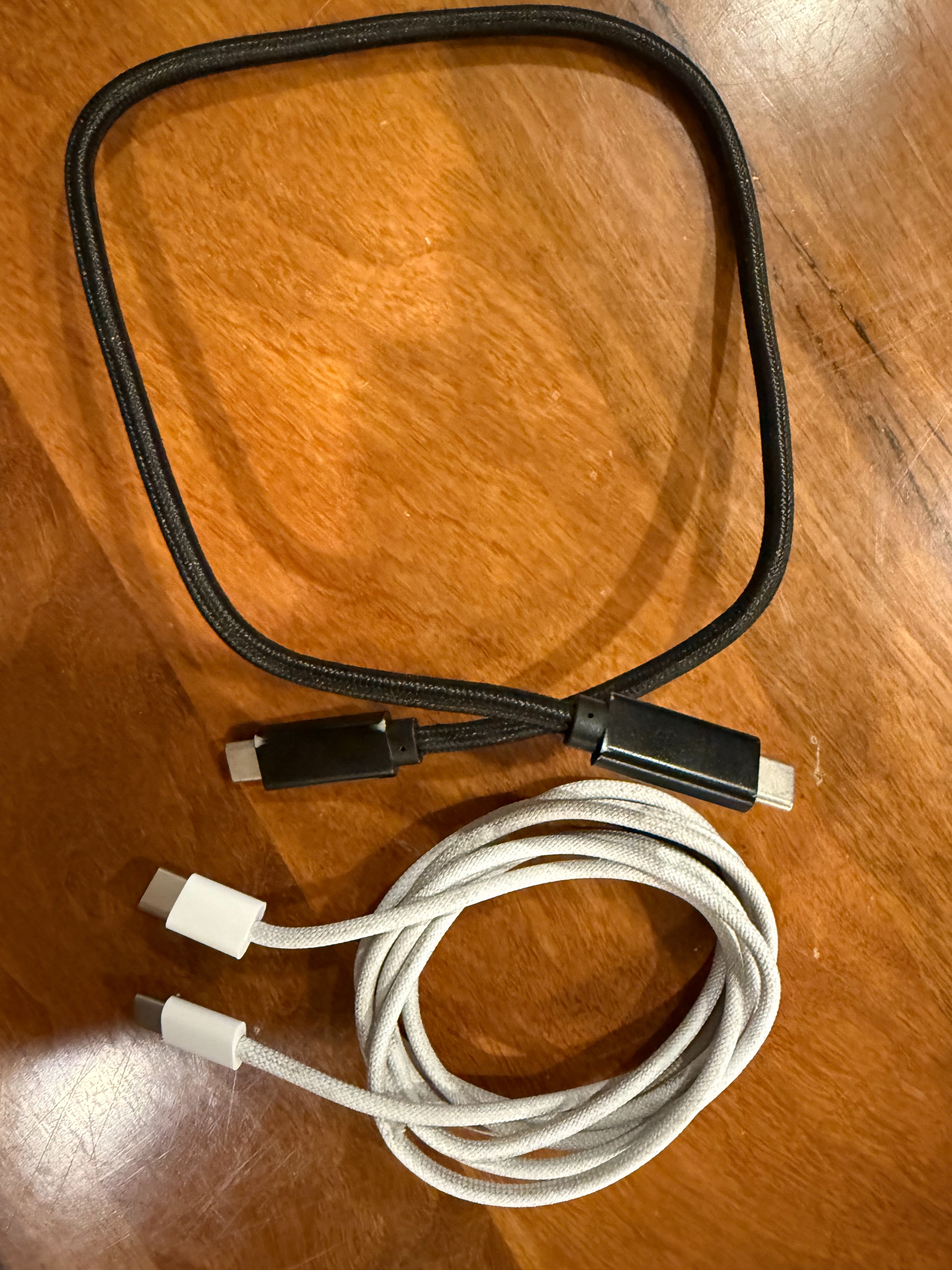
Based on this photo, can you tell me which cables picured are:
- USB 3.1
- Support 240W charging
- Provide data transfers at 20Gbps
No? Yeah, me neither. And I’m holding onto the damn things. Nowhere on these cables do they say what they can actually do.
If I plug in one end to a charger, and the other end to my phone or laptop, will it charge? Probably.
If I use one to connect an external hard drive to the computer I’m writing this post on, will it connect? Probably. Unless it’s a power-only cable that doesn’t support data transfer.
But I don’t know how fast it will charge the device I’m trying to charge, or at what speed it will allow data to be transferred between the two devices.
Just because a cable fits into a physical connection, doesn’t mean it should be used for the purpose you’re trying to use it for.
I’ve long enjoyed the setup of having “USB Hub” monitors in my home office. It means I can connect all my devices to the USB ports on the monitor, and then connect a laptop with a single USB cable which transfers video and data. It also means I can easily switch between using a laptop and my decktop PC with all the same devices, and they just nicely switch over to the correct machine, but that’s an aside.
A few years ago, I connected my laptop to the monitor using the single USB cable, and I was recording a technical video course. My microphone has a USB digital interface, which connects to a USB port on the monitor. I kept getting random crackles throughout the recording, and it took me hours and hours to troubleshoot. It was extremely frustrating.
In the end, the problem was the USB cable I was using between the monitor and the Dell XPS laptop. I can’t remember the specifics, but I suspect I was maxxing out the bandwidth capabilitiy of the cable, which caused the audio interface to drop in and out very quickly. After many hours of troubleshooting, I still didn’t know that cable was the culprit, but I’d pretty much ruled everything else out. I went to a local store, and bought the best cable that was available at the time. I can’t actually tell you what specs that cable is, because … well, it’s not written on the cable. But it did solve my problem.
Facing the same issue again today, in all honesty I’d probably still perform many minutes or even into an hour of troubleshooting, but if I had known the specs of the USB cable between my laptop and monitor were low, it might have made its way higher on my list of things to troubleshoot.
There’s a standard for this stuff
The USB-IF is the USB Implementers Forum, a non-profit corporation founded in 1995 by the group of companies that developed the USB specification (originally including Intel, Microsoft, Compaq, IBM, DEC, and others).
Among other responsibilities, they own maintaining and publishing the USB specifications. USB-IF is the body that owns and updates the official USB standards (USB 2.0, 3.x, USB4, USB Power Delivery, USB-C, etc.).
There’s also a USB Type-C Cable Logo Usage Guidelines document. If you scroll down a few pages, you’ll see examples of the logos USB-IF have created specifically to fix the exact problem I’m talking about. Clear marks in logos like “Certified USB 240W” or “Certified USB 40Gbps” that tell you, at a glance, what the cable can actually do.
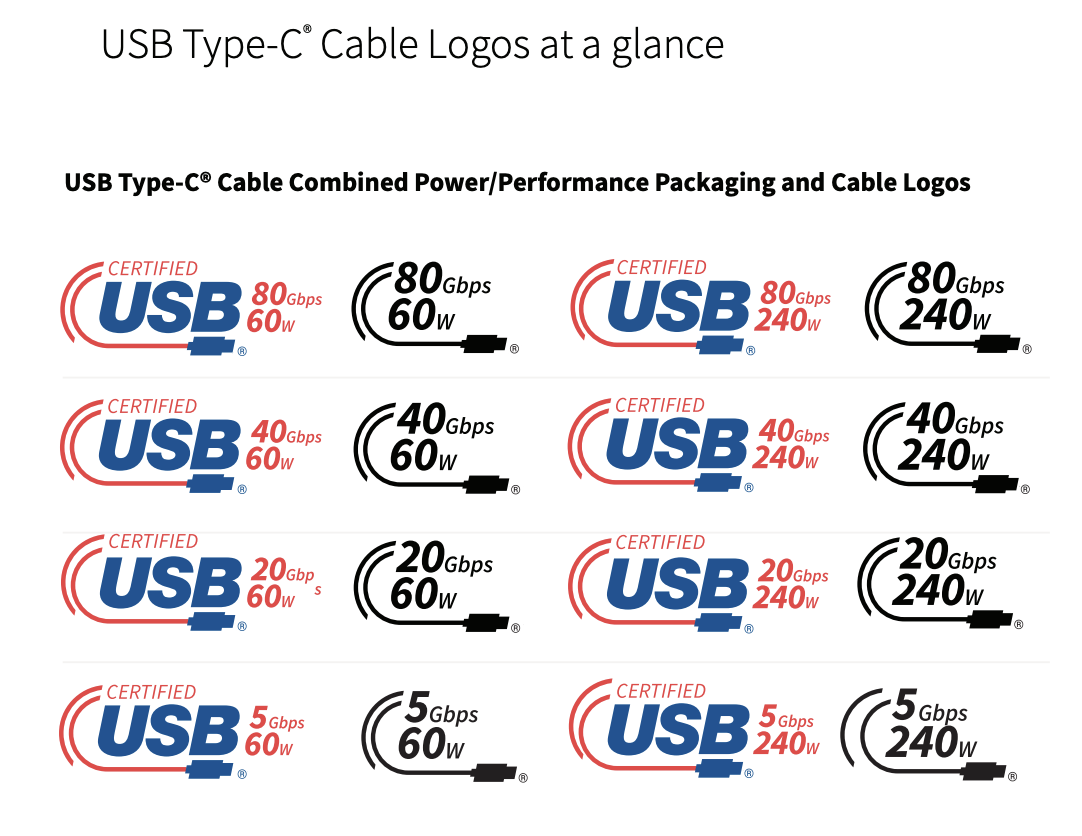
So why aren’t they on every cable?
Well, to put one of those logos on a cable, a manufacturer has to be certified by the USB-IF. In short, that means signing a trademark license, getting a Vendor ID, submitting the product for compliance testing at an authorised lab, passing those tests, and being added to the USB-IF Integrators List. It’s not a rubber stamp, and there are real costs and time involved, especially for smaller brands shipping a lot of different cables.
Linus Tech Tips (LTT) recently started selling their own USB cables, and they released a video to talk about them. I don’t own any LTT products, but from what I’ve read about the products they release including reviews from respected folks in the industry, they are of very high quality, and are reliable. I have no reason to believe their USB cables are any different. To quote Linus in the video:
You don’t need USB-IF Certification in order to sell USB compatible devices. In fact, as far as we can tell, the main benefit of it is to use their confusing branding which frankly, we feel we’re better off without, especially when you factor in the cost. Certification is both expensive and time consuming, which is why even some very large brands completely skip it.
And not being certified didn’t stop LTT from printing the specs of the cable clearly on each cable. Certification isn’t legally required to sell a USB cable. A manufacturer is perfectly free to make a cable, print “100W, 10Gbps, USB 3.2 Gen 2” right on the connector, and ship it. What they can’t do is slap the official USB-IF logo on it without going through the process above, as that’s a trademark, and using it without a license isn’t allowed.
So a cable that aligns with the USB standards but isn’t officially certified can still tell you what it does, it just can’t carry the official mark.
I truly don’t understand why all companies don’t just print the damn specs on the cable!
What can you do?
Well, one of the easiest options might be to keep doing what you’re doing, but label the cables as you procure them. The box will usually (not always!) say the specs of the cable, and you could use something like a label maker to print and attach a tag that won’t fall off. My suggestion would be to include the speed if it can do data transfer, and the Wattage it can provide for charging.
Optionally, it might be helpful to include which version of USB the cable is, as that can come in handy when you need to use certain versions or above for some devices.
My preference moving forward it to purchase cables that have their capabilities printed/attached to the cable. And I do mean the cable, not just the box. And while aligning with USB-IF certified cables would be great, that’s not a hard requirement for me. I just want reliable cables from reputable brands, with the specifications clearly labelled on the cable itself.
I don’t want to promote any specific brand, and what’s available to you might be different to me as I’m based in Australia. I really like Cygnett cables, but in my experience they lack the exact thing I’ve mentioned in this post.
I’ve mentioned LTT earlier in this thread, and if you look at the cables they released, the specs are printed into the plastic shielding around the USB connector.
Belkin do look to be prinitng the specs on most of their cables now, as you can see in this example.
In fact, I recently happened to buy a few Belkin chargers and cables from our local electronics store, so I went and grabbed one that was still in the box.
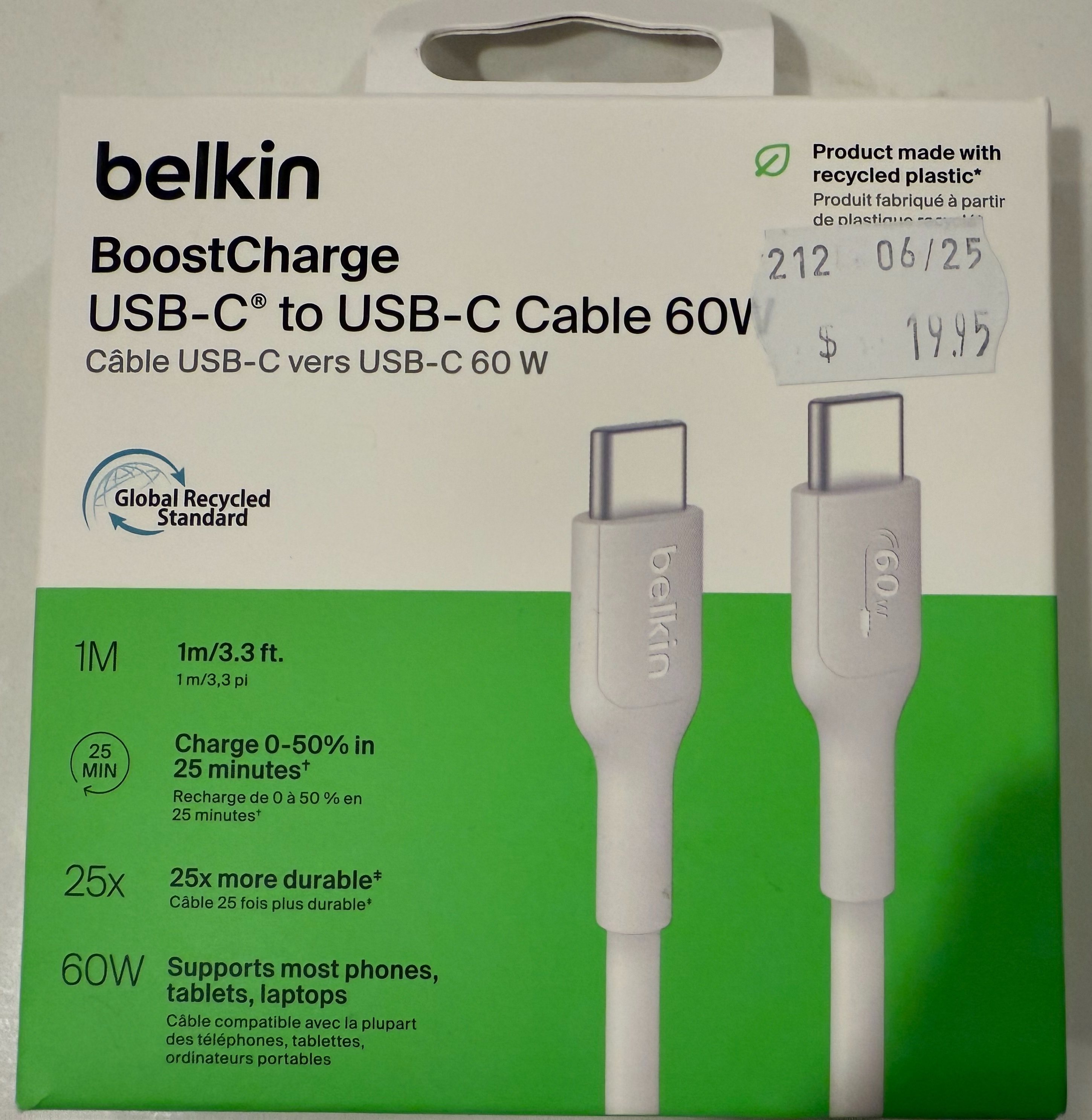
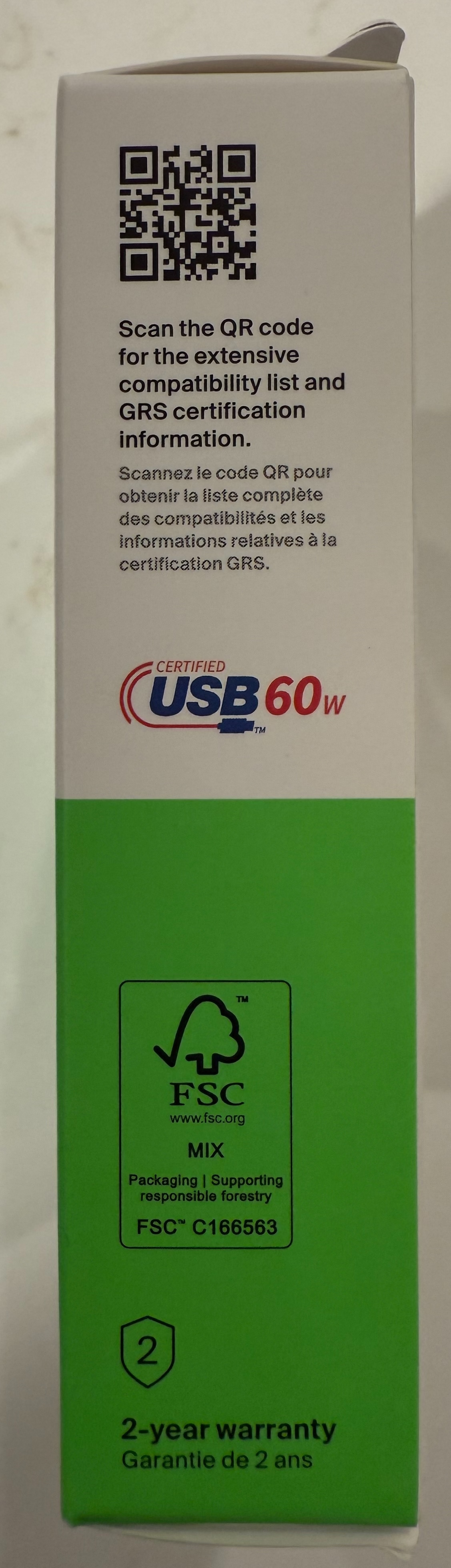
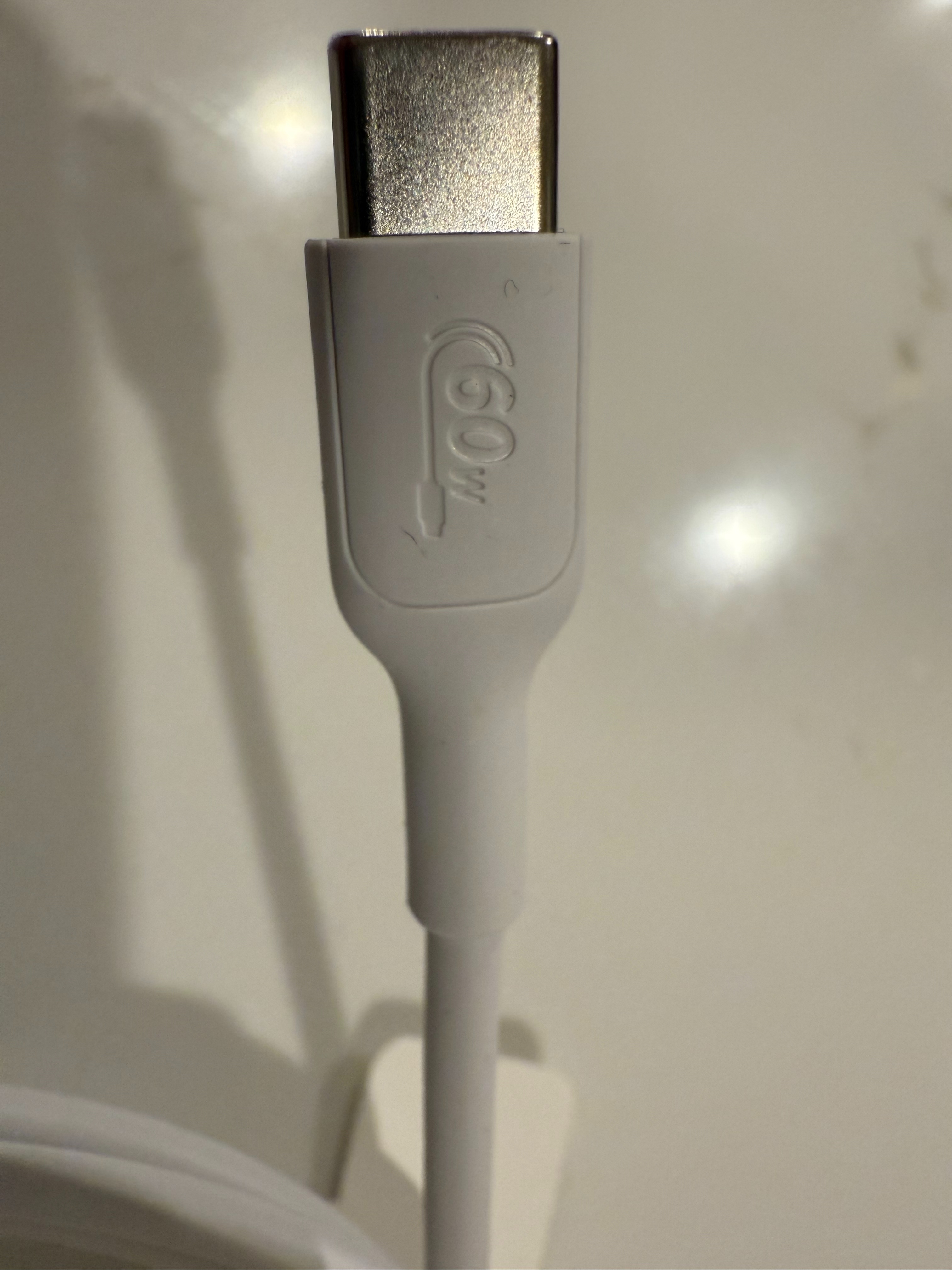
As it happens, Belkin do look to be USB-IF certified. I didn’t know that before right now, where I saw the logo on the packaging. On the packaging it is quite clear it is a USB-C cable that supports 60W for charging, and doesn’t support data transfer. I opened the box to have a look at the cable, and the specs are embedded on both ends of the cable, and in this instance they happen to be the USB-IF certified logos, but they don’t need to be.
So that’s my rant. Hopefully I’ve left you with a few ideas on how to move forward if you face this problem too. As the unofficial “tech support” for my family, I’m encouraging them to purchase cables with clear labels on what the cable can actually do.
I’m curious to know if you’ve felt this pain, and what your solution has been.